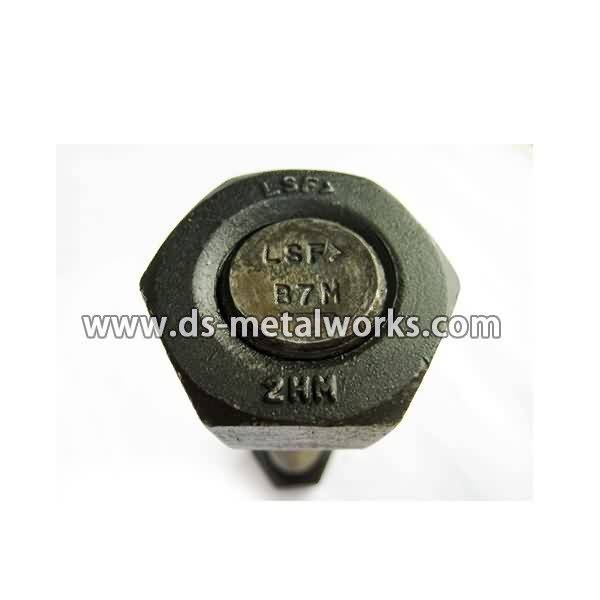
Round Head Bolts Price - ASTM A193 A320 B8 Threaded Stud Bolts – Dingshen Metalworks
Short Description:
ASTM A193 A320 B8 All Threaded Stud Bolts Standard: IFI-136, ASME B16.5, DIN976 Inch Size: 1/4”-4” with various lengths Metric Size: M6-M100 with various lengths Other Available Grade: ASTM A193/A193M B8 Class 1 & 2, B8M Class 1 & 2, ASTM A320/A320M B8 Class 1 & 2, B8M Class 1 & 2 Finish: Plain, PTFE etc. Packing: Bulk about 25 kgs each carton, 36 cartons each pallet Advantage: High Quality and Strict Quality Control, Competitive Price,Timely Delivery; Technical Support, Suppl...
Product Detail
Product Tags
Round Head Bolts Price - ASTM A193 A320 B8 Threaded Stud Bolts – Dingshen Metalworks Detail:
ASTM A193 A320 B8 All Threaded Stud Bolts
Standard: IFI-136, ASME B16.5, DIN976
Inch Size: 1/4”-4” with various lengths
Metric Size: M6-M100 with various lengths
Other Available Grade:
ASTM A193/A193M B8 Class 1 & 2, B8M Class 1 & 2,
ASTM A320/A320M B8 Class 1 & 2, B8M Class 1 & 2
Finish: Plain, PTFE etc.
Packing: Bulk about 25 kgs each carton, 36 cartons each pallet
Advantage: High Quality and Strict Quality Control, Competitive Price,Timely Delivery; Technical Support, Supply Test Reports
Please feel free to contact us for more details.
Product detail pictures:

continue to enhance, to be certain solution top quality in line with market and buyer standard requirements. Our corporation has a excellent assurance program are actually established for Round Head Bolts Price - ASTM A193 A320 B8 Threaded Stud Bolts – Dingshen Metalworks, The product will supply to all over the world, such as: Toronto, Iran, belarus, As a way to make use of the resource on the expanding information and facts in international trade, we welcome prospects from everywhere on the web and offline. In spite in the top quality products we offer, effective and satisfying consultation service is supplied by our specialist after-sale service group. Solution lists and detailed parameters and any other info weil be sent to you timely for the inquiries. So please get in touch with us by sending us emails or contact us if you have any concerns about our firm. ou can also get our address info from our web site and come to our enterprise. or a field survey of our solutions. We're confident that we are going to share mutual results and build solid co-operation relations with our companions in this market. We're looking forward to your inquiries.
Video of what the inside of a Dana 60 hub looks like and how to get it off. READ THIS FOR MORE IMPORTANT INFORMATION:
- I am not a professional mechanic. Use these instructions at your own risk. Always wear your safety gear and follow safe work shop practices.
- If you are replacing the hub bearings, make certain that the races are included with the bearings. I assumed that the races would be included and they were not. Ordering the needed races delayed my project and cost me additional shipping charges.
- I believe that these stock locking hubs are made by Warn but I’m not positive. Your locking hubs might be a little different.
- Here is the Dana 60 bible with TONS of information: https://www.billavista.com/tech/Articles/Dana_60_Front_Axle_Bible/
- My hub nut socket is made by Lisle https://www.lislecorp.com . Look in their specialty tools section and there is also more application information in their downloads section. My socket is # 29900 but your truck might require a different socket. I bought mine from RockAuto. Enter your make/year/model/engine information and then click on the “Tools and Universal Parts” tab. Look under Drivetrain–Tool–Lock Nut Tool. $14-$19 depending on which socket you choose. I think Lisle sockets are also available from O’Reilly Auto Parts https://www.oreillyauto.com .
- If you need replacement or upgraded parts for your Dana 60, try Offroad Design: https://www.offroaddesign.com/catalog/Dana60frontaxleparts.htm .
LET’S CONNECT!
God’s Country’s Accounts:
- https://gplus.to/GodsCountry
- https://www.facebook.com/godscountrychannel
- https://twitter.com/In_Gods_Country
https://bit.ly/1ut4YrE This ANSYS How To video will demonstrate how to use the weld feature in ANSYS DesignModeler to form a touching condition between adjacent surface parts. ANSYS DesignModeler software is the gateway to geometry handling for analysis with software from ANSYS. ANSYS DesignModeler has connections to all major CAD systems, allowing seamless transfer of existing data including parameters. The parameters can then be adjusted and the design updated, and any feature removal or simplification is maintained. This results in rapid turnaround of any design changes and updates. For more information, please visit ansys.com.